Appearance
Exploring Public Memos
The Explore page shows publicly shared memos from all users on your Memos instance. This is where you discover content from other community members and find new ideas.
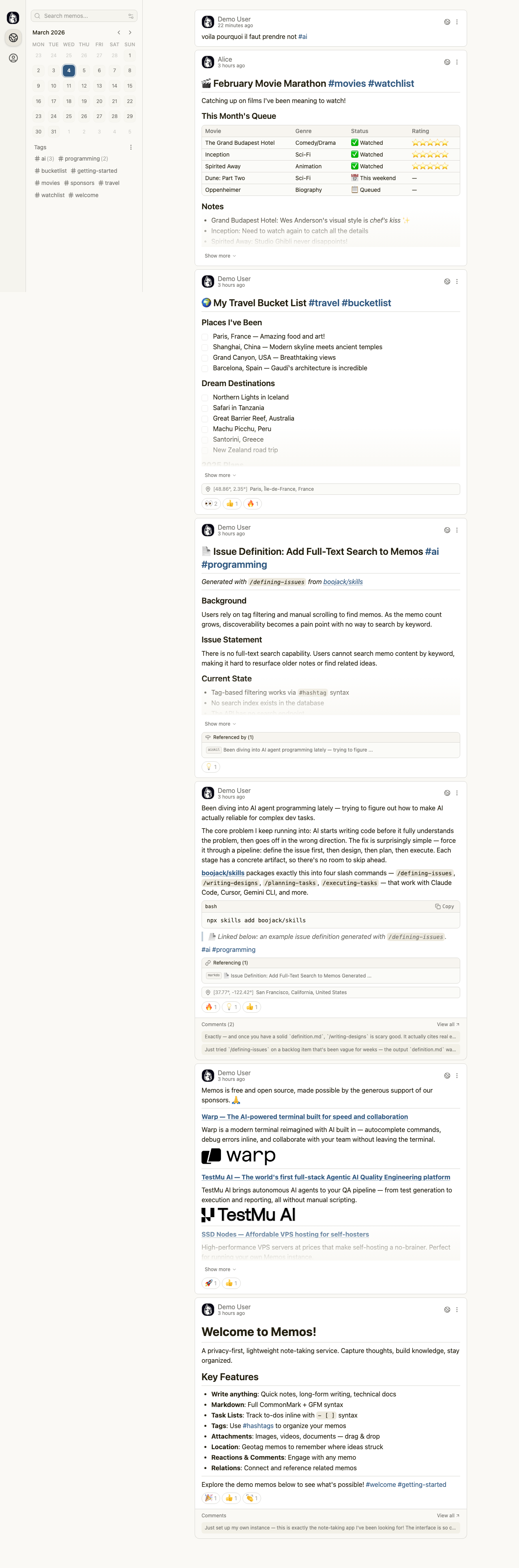
Browsing the Feed
The Explore page displays memos from all users who have shared content publicly. Each memo card shows:
- The author name [2] linked to their profile page
- The posting timestamp
- The full memo content with Markdown rendering
- Emoji reactions from other users
- Comment counts and previews
Memos from different authors appear in the feed. For example, you might see content from Demo User [2] alongside posts from Alice [3] and other community members.
Activity Calendar
The left sidebar features a monthly calendar [1] that highlights days with posting activity. Dates with green dots indicate that memos were created on those days. Click any highlighted date to filter the feed and view memos from that specific day.
You can navigate between months using the arrow buttons next to the month name.
Tags Sidebar
Below the calendar, the Tags section lists all hashtags used across public memos. Click any tag to filter the feed and show only memos containing that tag. Common tags on the demo include topics like ai, programming, travel, movies, and getting-started.
Interacting with Memos
On the Explore page, you can interact with memos in several ways:
- React with emoji reactions by clicking the reaction buttons below each memo
- View comments by clicking the comment count or "View all" link
- Navigate to the full memo by clicking the memo title or content area
- Visit author profiles by clicking the author name link
Reactions provide a lightweight way to acknowledge content. The reaction buttons show the emoji and current count, making it visible how many people have responded to each memo.