Appearance
User Profiles
Each Memos user has a dedicated profile page that displays their public information and shared memos. Profile pages are accessible to anyone on the instance.
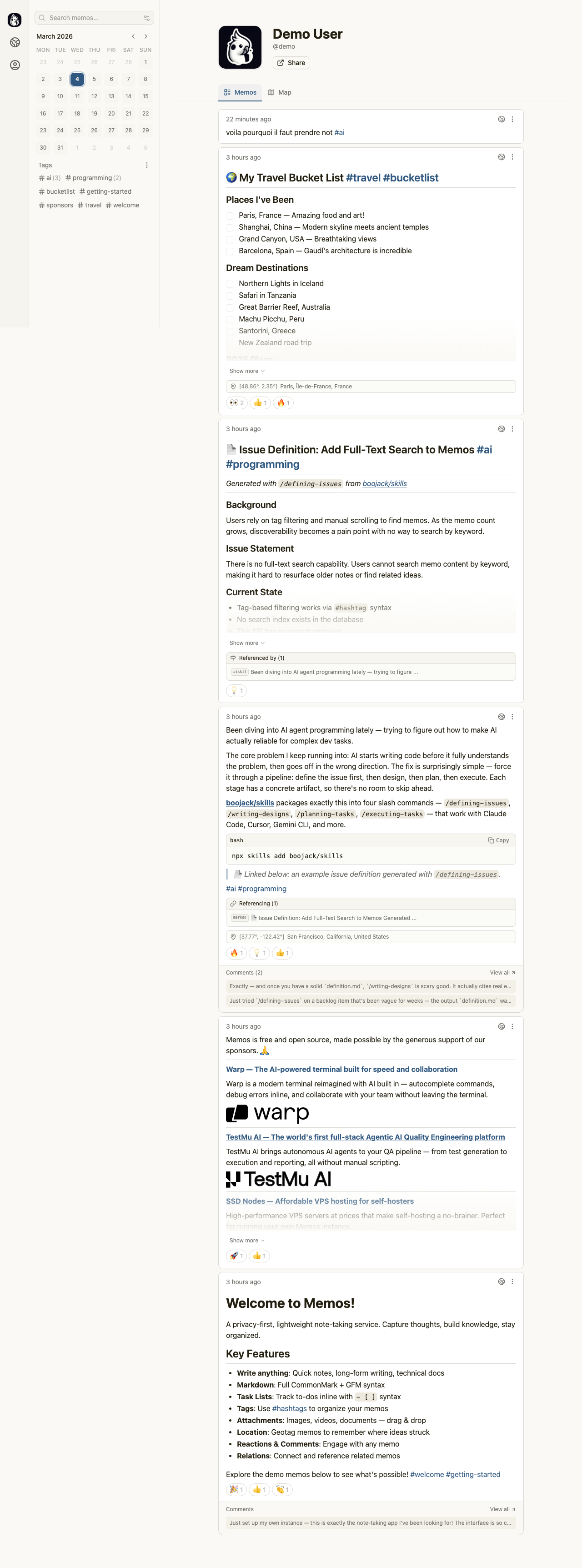
Profile Overview
The profile page header shows the user's display name [1] prominently at the top. Below the name, you'll find a Share button [2] that copies the profile URL to your clipboard for sending to others.
Content Tabs
The profile page organizes content into tabs:
- Memos [3] — The default tab showing all public memos posted by this user, displayed in reverse chronological order
- Map [4] — A geographic view showing memos that have location data attached
Switch between tabs by clicking the tab labels. The currently active tab appears highlighted.
Browsing User Memos
The Memos tab displays the user's published content with full Markdown rendering. Each memo includes:
- The publication date and time
- Rendered Markdown content including headings, lists, code blocks, and embedded images
- Hashtags that link to tag-filtered views
- Emoji reaction counts
- Comment previews with links to the full discussion
The calendar widget in the left sidebar shows this specific user's posting activity, making it easy to see how consistently they contribute.
Visiting Other Profiles
You can reach any user's profile by clicking their name in memo cards throughout the application. Profile URLs follow the pattern /u/{username}, making them predictable and shareable.